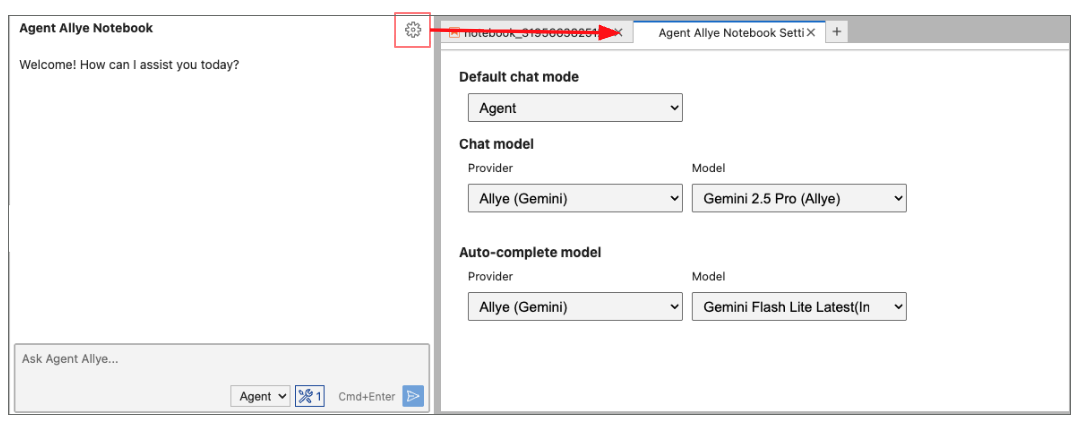
Notebook Agent Settings
Product: Allye Pro
Tips & Configuration
Use the tips below to get the most out of the Agent:
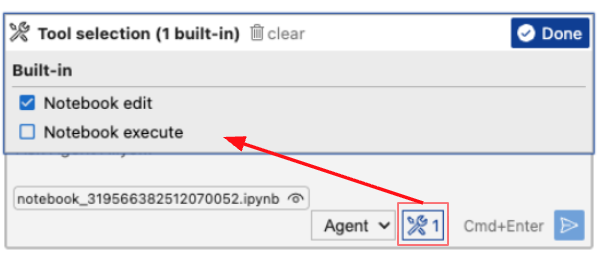
1. Tool selection
| Tool | Description |
|---|---|
| Notebook edit | Grants the Agent permission to edit the notebook. With this permission, the Agent can create cells and generate Python code or markdown text within the notebook. |
| Notebook execute | Grants the Agent permission to execute the notebook. With this permission, the Agent can interpret execution results and perform debugging if errors occur. |
2. Chat model, Auto-complete model
You can select which model to use. As of 2025/12/7, Gemini 3 Pro offers the best performance, but it is also the most expensive model.