Canvas Agent Settings
Tips & Configuration
Use the tips below to get the most out of the Agent:
1. Data First
Always load your data into the canvas before asking the AI a question. The AI cannot fetch data from local files, connect to databases, or run SQL on its own.
- Use the
File,DB Connector&SQL Executor, orGoogle Spread Sheetwidgets to bring in data. - You can also use
Python Notebookwidget for other data sources.
2. Choose a mode
The AI offers two modes: Copilot mode only builds and runs workflows, while Agent mode additionally outputs a PDF report, interprets the results, and proposes next steps. Choose the right one for your preference.
- In
Agent modethe AI owns the analysis end to end and reports its conclusions. - In
Copilot modeyou remain in control, and the AI simply assists with data transformations or visualizations, statistical modeling. - Enable Agent mode by checking "Include reporting, interpretation..." in Agent Settings otherwise AI will be Copilot mode.
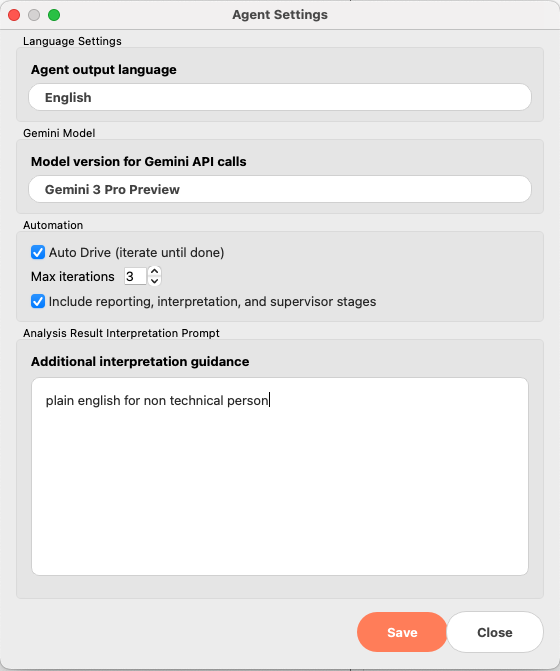
3. Configure Max Iteration
In Agent mode, after every run the AI reviews whether the results satisfy the your request and continues working if anything is still missing.
- Configure the maximum number of iterations via "Max Iteration" in Agent Settings. (See above img)
4. One Canvas, One Agent
Each canvas hosts one process. To run two analyses in parallel, press cmd + n to open a new canvas.
Note:
As of 2025-12-01, the AI can operate limited widgets under Visualization, Statistical Analysis, and Causal Analysis.
- It cannot generate widgets in other sections such as
Model, though coverage will expand over time. - Availebls widgets:
- Visualize:
Bar/Line Plot,Scatter Plot,Distributions - Data Manipulation:
Notebook - Statistical Analysis:
Correlations,Regression Analysis,Binary Analysis,Poisson Regression,Time Series Analysis - Causal Analysis:
AB Test,Propensity Score Matching,Causal Tree/Forest,Linear/Forest DML,DID
- Visualize: